STOP WASTING
CONNECTS
ON BAD JOBS
Most freelancers don't lose because of bad proposals. They lose because they choose the wrong jobs.
Most tools help you apply faster. OmniLancr helps you decide what's worth applying to — then assembles the proposal, screening answers, milestones, and proof in one click for the jobs that are.
// Coverage includes
TWO SOURCES,
ONE DECISION LAYER
Upwork and Freelancer jobs land in one shared feed, then OmniLancr helps you separate real opportunities from connect-wasting noise before you write anything.
Upwork listings get opportunity labels, connect-cost cues, client quality signals, and a complete application package only when the job looks worth pursuing.
Freelancer jobs sit in the same ranked feed, so you can shortlist the promising ones, ignore weak bids, and only prep applications when the opportunity is real.
The point is not to draft faster for every listing. The point is to know which jobs deserve your time, then prepare a stronger application for those.
JOB QUALITY
SIGNALS FIRST
OmniLancr starts with the question that matters most: is this job worth a connect, a bid, or your attention? It labels strong opportunities, flags caution jobs, highlights likely low ROI listings, and surfaces client quality before you write a word.
- ◆Strong opportunity, caution, and low ROI labels at a glance
- ◆Client quality, payment verification, and competition cues
- ◆Upwork connect-cost badges when a job is expensive to test
- ◆Recommended sorting blends fit with opportunity quality
- ◆Low competition and freshness filters help you move early
- ◆Bookmarks and drafted-job filters keep attention on the best bets
ONE CLICK
PREPARES
EVERYTHING
Most freelancers spend 45 minutes building an application from scratch. OmniLancr does it in one click — proposal draft, screening answers, milestone plan, and proof selection assembled together before you've touched the platform.
You review. You tighten. You send. OmniLancr never submits anything without you.
START FROM A
DRAFTED PROPOSAL,
NOT A BLANK PAGE
Once a job looks worth pursuing, OmniLancr prepares the proposal and screening answers fast. You still review everything, but you start from a drafted application instead of building it line by line from zero.
- ◆Four tone options for matching the client and job
- ◆Imported screening questions become paste-ready answers
- ◆Proposal, screening, proof, and scope stay in one flow
- ◆Edit anything manually or regenerate when needed
- ◆Copy proposal and answers separately at the end
- ◆No auto-submit — you stay in control of what gets sent
- ◆Selected proof context keeps the writing grounded
THE RIGHT PROOF
SELECTED FOR THIS
SPECIFIC JOB
For jobs worth chasing, OmniLancr helps you choose the proof that strengthens the application — live case studies, summaries, downloadable assets, and the right supporting material for the pitch.
- ◆Recommend the strongest case studies and assets for each job
- ◆Copy live case study links when the client should see the real work
- ◆Copy summaries when a quick proof snippet fits better
- ◆Download selected files for platform attachments
- ◆Selected proof carries into proposal and screening drafts
- ◆Case studies stay reusable across future applications
REVIEW ONCE.
COPY WHAT YOU NEED.
SEND.
This is the differentiator: proposal, screening answers, milestone plan, and proof assembled together so you can review once, copy what you need, and submit on the platform.
- ◆Proposal, screening answers, scope, and proof in one review area
- ◆Copy each part separately without rebuilding context
- ◆Open on Upwork or Freelancer when you are ready to submit
- ◆Proof actions stay nearby for fast copy or download
- ◆The package stays editable until you send
- ◆Built to reduce tab switching and last-minute scrambling
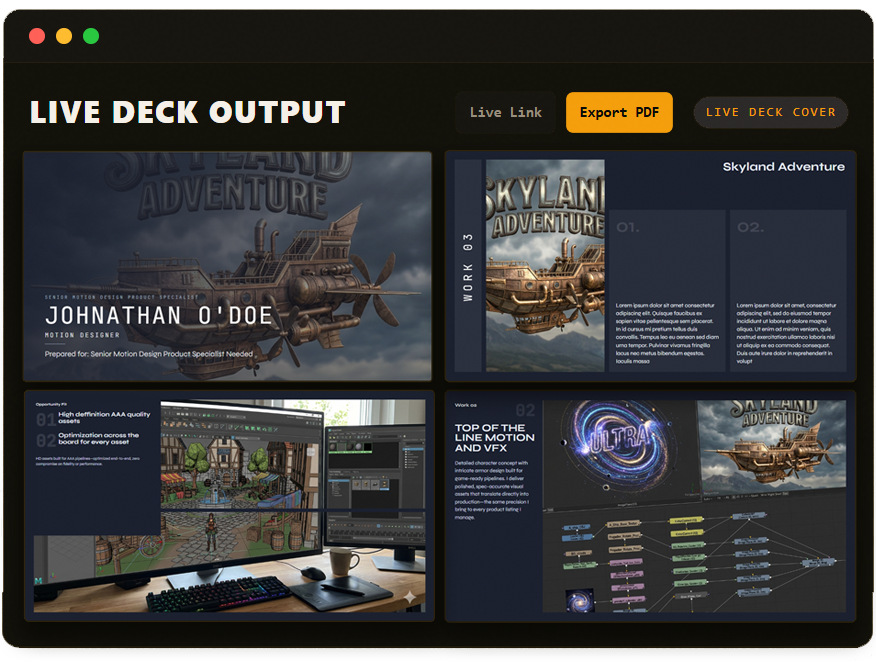
A LIVE PORTFOLIO LINK
WHEN THE JOB NEEDS
MORE THAN TEXT
When a good job needs extra trust, turn your selected proof into a polished share link or PDF a client can click through to see the real work behind your pitch.
- ◆Build decks from the same proof you selected for the application
- ◆Turn case studies, assets, and metrics into one polished share link
- ◆Best when a stronger trust layer helps close the gap
- ◆Export as a PDF or send the live public link
- ◆Decks stay downstream from job selection and application prep
- ◆Useful when the client needs more than a text-only proposal
PROPOSAL COMPANION
FILL UPWORK AND FREELANCER PROPOSALS IN ONE CLICK
OmniLancr Proposal Companion connects your prepared application package to the job page you have open. When you're ready to submit, the extension fills your cover letter, milestones, and attachments directly into Upwork or Freelancer — no copy-pasting, no tab switching.
- ◆Detects the job listing you have open automatically
- ◆Matches it to your prepared OmniLancr proposal package
- ◆Fills cover letter, milestones, and attachments in one click
- ◆Bookmark any job to OmniLancr directly from the listing page
- ◆Works on both Upwork and Freelancer.com
- ◆You stay in control — nothing submits without you
MOST TOOLS HELP YOU
APPLY FASTER.
OMNILANCR HELPS YOU
DECIDE WHAT'S WORTH YOUR CONNECTS —
THEN PREPARES THE FULL APPLICATION IN ONE CLICK.
Every good application makes the next one faster. Your proof, milestones, decks, and case studies compound instead of starting from zero every time.
SCORE FIRST.
THEN APPLY.
Set Your Mode
Pick a niche mode and keep your proof library ready so OmniLancr knows what good work looks like for you.
Score the Opportunity
OmniLancr rebuilds your shortlist from the shared feed and ranks jobs by fit plus opportunity quality.
Prepare the Package
Build the proposal, screening answers, milestone plan, and proof context together in one cockpit.
Copy & Submit
Review the application package, copy what you need, then open the platform and send it yourself.
PICK YOUR
LANCR LEVEL
Stop wasting connects on bad jobs. OmniLancr helps you score the opportunity first, then prepare the full application package for the ones worth pursuing.
Start free, feel the difference, then unlock the full application package when you're ready.
Annual is the default view and still shows the monthly amount you'd pay, just discounted by 20% and billed yearly.
See which Freelancer jobs are worth your time, then test the application workflow without paying for noise.
- ◆Freelancer shared feed
- ◆12 AI proposal drafts/month
- ◆Opportunity labels + fast triage
- +Screening answer drafts
- +Manual proof selection
- +Asset library access
- +Services + Case Studies
- +1 mode
- +3 deck exports/month
- +1 live deck link - 2 live case study links
Score Upwork and Freelancer jobs, then prepare the full application package for the ones worth sending.
- ◆Upwork + Freelancer opportunity feed
- ◆100 AI proposal drafts/month
- ◆AI proof recommendations
- +Screening answer drafts
- +Application package review
- +Refresh matches on demand
- +3 modes
- +12 deck exports/month
- +Asset library + case studies
- +4 live deck links - 10 live case study links
- +Basic analytics
For freelancers running multiple lanes who want better opportunities surfaced faster and watched in the background.
- ◆Everything in Scout
- ◆Faster opportunity refresh
- ◆Background refresh and alerts
- +250 AI proposal drafts/month
- +30 deck exports/month
- +6 modes
- +12 live deck links - 24 live case study links
- +Password protected decks
- +Advanced analytics
Priority niche coverage and the highest workflow headroom for serious operators running a real pipeline.
- ◆Everything in Operator
- ◆Priority niche coverage
- ◆Highest workflow limits
- +600 AI proposal drafts/month
- +80 deck exports/month
- +12 modes
- +Unlimited live deck & case study links
- +Team asset library
- +Priority support
COMMON
QUESTIONS
OmniLancr helps you stop wasting connects on bad jobs. It scores opportunity quality, prepares a complete application package, and keeps the whole workflow in one place.
Yes — OmniLancr is built around niche modes, not one generic freelancer profile. Whether you're an engineer, designer, marketer, 3D artist, or something more specialized, the shared feed is re-ranked around what that mode cares about.
It is not just a job list. OmniLancr helps you decide whether a job is worth your time, your bid, or your connects before you start writing anything.
The package brings together the proposal draft, screening answers, milestone plan, and selected proof for the current job. You review it once, copy each part separately, and then open the platform to submit.
OmniLancr looks at the job plus your saved case studies and asset library, then recommends which proof to use. That can mean a live case study link, a quick summary, or a file you can download and attach.
No — automated bidding violates most platform terms of service. OmniLancr prepares the application package, but you stay in control of the final edit and click submit yourself.
Filter jobs by platform, opportunity label, budget range, competition, freshness, and match quality. Your filters save automatically so the feed stays tuned to how you actually work.
Yes — OmniLancr also tracks proposal activity and delivery outcomes, but analytics stay downstream from the real job: deciding what is worth your connects and preparing the full application.
Yes — cancel any time from your settings page. No contracts, no commitments. Your data stays accessible until the end of your billing period.
STOP WASTING CONNECTS
ON BAD JOBS
Start free, score the opportunity first, and only spend time on applications that are actually worth sending.
See Which Jobs Are Worth It — No Credit Card →